Authentication & API keys
Create org-scoped API keys, choose which project a call targets, and use keys with the SDK, CLI, and API.
Anything calling Compass from outside the app — the API, the CLI, or the Python SDK — authenticates with an API key. A key is organization-scoped: it works across the projects in your organization, and you choose which project a given call targets.
Creating a key
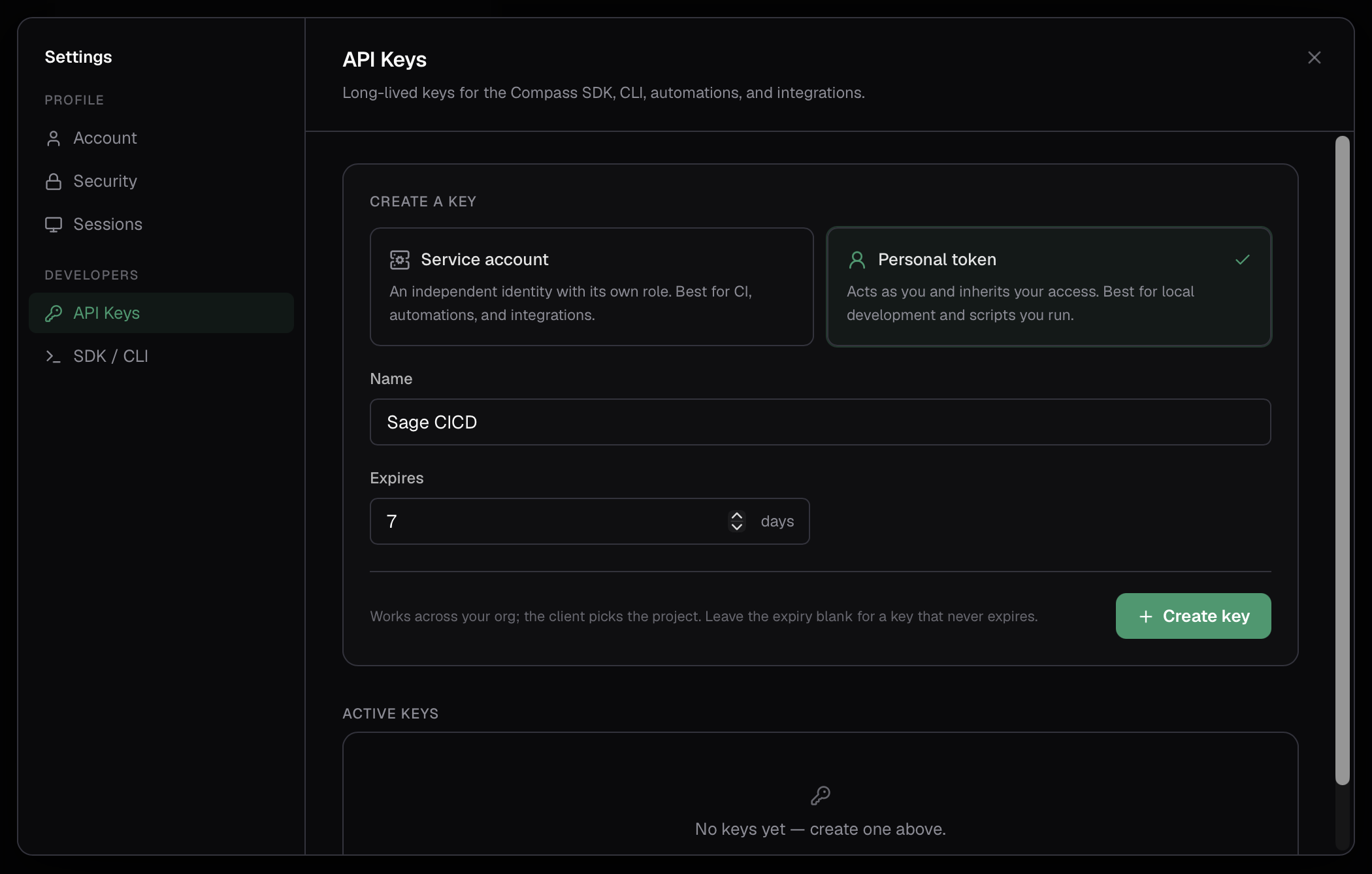
Go to Settings → Developer → API keys and fill in:
- Name — something recognizable, like "CI Pipeline".
- Type — a service account (an independent identity) or a personal token (which inherits your own access). Creating a service account requires an organization admin; anyone can create a personal token for themselves.
A key works across your organization; you don't pick a project here — that's chosen per request (see below).
When you create the key, its credential is shown once. Copy it and store it somewhere safe — Compass doesn't keep a copy, so you can't retrieve it again afterward. If you lose it, revoke the key and create a new one.
The list shows every key you're allowed to see: organization admins see all of the organization's keys, everyone else sees the personal tokens they own.
Treat keys like passwords
A key grants access to your organization's projects. Keep it out of source control, prefer environment variables or a secrets manager, and give each system its own key so you can revoke one without disrupting the others.
Service accounts vs personal tokens
- A service account is its own identity, independent of any person, with its own role across the organization's projects — the right choice for automations, CI, and backend integrations that should keep working regardless of who set them up.
- A personal token acts as you, inheriting your access — it can work in any project you're a member of, with the role you hold there. Handy for quick scripts and local experimentation.
In both cases the key's role determines what it can do in a project, using the same roles people hold. Building, running, and managing connections need a Developer role; managing people, settings, and spend limits needs an Admin role. Because a personal token tracks your live access, losing access to a project disables the token there at once.
Using a key
A Compass key isn't a bearer token you send directly — it's a self-contained credential that gets exchanged for a short-lived access token, which is what actually rides on the request. The SDK and CLI do that exchange for you and refresh it as needed; you only ever handle the key.
A common pattern is to keep the key in an environment variable; the CLI reads
COMPASS_API_KEY (and COMPASS_BASE_URL) automatically:
export COMPASS_API_KEY="<your-api-key>"
export COMPASS_BASE_URL="https://your-compass-url"
Choosing a project
Because a key spans your organization, you tell Compass which project a call should act in. How you do that depends on the client:
| Client | How you set the project |
|---|---|
| CLI | compass projects use <project-id>, or --project <id> per command, or COMPASS_PROJECT_ID. |
| SDK | the project_id argument on the client. |
| HTTP | the X-Compass-Project-Id header. |
See choosing a project for all three in detail.
If you don't specify one, calls act on your organization's default project. Use
compass projects list (or client.projects.list()) to see the projects a key can
act on and your role in each.
Revoking a key
In Settings → Developer → API keys, each key shows its type and creation date. Click Revoke to disable it immediately — any client using it stops working at once. Revocation can't be undone.