API, CLI & SDK
Call Compass over HTTP, from your terminal, or from Python — one surface, three clients, every example in all three.
Everything you can do in the app you can do from outside it. There's one HTTP API underneath, and three ways to call it:
- API — the raw HTTP surface. Use it from any language or tool that can make a request.
- CLI — the
compasscommand. A full management surface for your terminal — not just running and inspecting work, but authoring it: create agents, build and deploy workflows, manage connections, every command scriptable for automation and CI. - Python — the async Compass SDK,
from compass_core import Compass. The same wheel as the CLI, imported as a library, exposing every resource you work with in the app.
Pick your client once
Every example on this page comes in all three flavors. Switch any code block to API, CLI, or Python and the whole page follows — the choice is remembered next time you visit.
Install
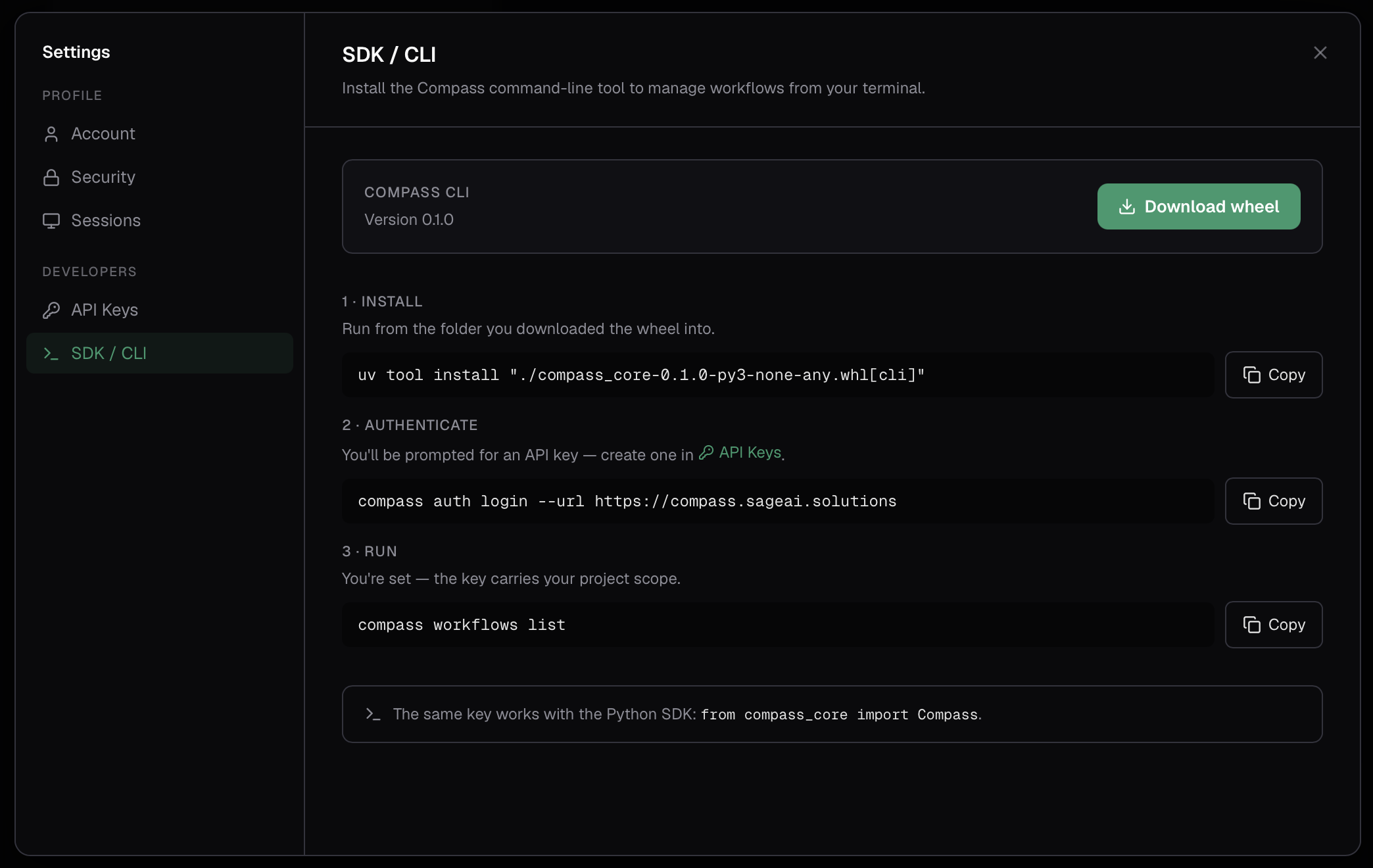
The CLI and the SDK ship in a single Python wheel you download from the app, at Settings → Developer → SDK & CLI (the Download wheel button). The API needs no install at all.
Nothing to install. Calls go to your Compass URL — the same address you use to sign
in — under the /v1 prefix:
https://your-compass-url/v1Authenticate
Every client authenticates with an API key — create one in Settings → Developer → API keys and copy it (it's shown only once).
A key is not a bearer token. It's a self-contained credential that you exchange for a short-lived access token, and that access token is what actually rides on each request. The CLI and the SDK do the exchange for you and refresh it as it expires; over raw HTTP you do it yourself.
Authenticating by hand is three steps: read the values out of your key, exchange them for an access token, then call the API with that token.
1 — Read the values out of your key. The key is base64url-encoded JSON. Any base64url decoder will do; this one needs nothing but Python:
python3 -c "import base64, os; k = os.environ['COMPASS_API_KEY']; print(base64.urlsafe_b64decode(k + '=' * (-len(k) % 4)).decode())"It prints the three values the key carries:
{
  "token_url": "https://auth.your-compass-url/application/o/token/",
  "client_id": "…",
  "client_secret": "…"
}
Take token_url from the key rather than guessing it — it's your sign-in provider's
token endpoint, which is a different hostname from the Compass API.
2 — Exchange the key for an access token using the OAuth2 client-credentials grant, posting those three values as form fields:
COMPASS_ACCESS_TOKEN=$(curl -s -X POST "<token_url>" \
  -d grant_type=client_credentials \
  -d client_id="<client_id>" \
  -d client_secret="<client_secret>" \
  -d scope=openid | jq -r .access_token)
The reply is a standard OAuth2 token response: access_token is the token to send,
and expires_in says how many seconds it stays valid. It's short-lived, so a
long-running caller repeats this exchange when it lapses — which is exactly what the
SDK and CLI do on your behalf. Keep the key; it's what you re-exchange with.
3 — Call the API with that access token as the bearer:
curl https://your-compass-url/v1/projects/ \
  -H "Authorization: Bearer $COMPASS_ACCESS_TOKEN"
Every API example below assumes $COMPASS_ACCESS_TOKEN holds a token that's still
valid.
Or let a client do it
The CLI and the SDK take the key directly and handle the exchange and the refresh internally. If you'd rather not manage token lifetimes yourself, authenticate with one of them.
Profiles and environment
CLI credentials are stored in a config file under ~/.config/compass/, and you can
keep several profiles (for example, different organizations or environments):
compass config list          # show saved profiles
compass config use <name>    # switch the default profile
compass --profile <name> ... # use a profile for one command
Any command also reads these environment variables, which override the saved profile:
| Variable | Purpose |
|---|---|
COMPASS_API_KEY | The API key to authenticate with. |
COMPASS_BASE_URL | Your Compass URL. |
COMPASS_PROFILE | Which profile to use. |
COMPASS_PROJECT_ID | The project to act in (see below). |
Choose a project
Your API key is organization-scoped, so you tell Compass which project a call should act in. Skip it and calls act on your organization's default project.
Send the project on each request as a header:
X-Compass-Project-Id: <project-id>GET /v1/projects/ lists the projects your key can reach and your role in each.
Run an execution
Execution is asynchronous: you dispatch work and get back an execution you then
poll or stream until it finishes. Provide either a deployment_id (the live
version) or a workflow_id (a specific workflow or agent), plus the input. The
response has an id and a status — the id is typed by what you dispatched:
workflow_execution_<hex> or agent_execution_<hex>.
curl -X POST https://your-compass-url/v1/executions/ \
  -H "Authorization: Bearer $COMPASS_ACCESS_TOKEN" \
  -H "X-Compass-Project-Id: <project-id>" \
  -H "Content-Type: application/json" \
  -d '{
    "deployment_id": "<deployment-id>",
    "input_data": { "topic": "Q3 report" }
  }'
Get the result
Once dispatched, read the execution by id to check its status and output. Poll
until it reaches a terminal state — or stream it instead.
curl https://your-compass-url/v1/executions/<execution-id> \
  -H "Authorization: Bearer $COMPASS_ACCESS_TOKEN"
Stream it live
For real-time output, subscribe to the execution's event stream — a Server-Sent Events connection that emits each event (tool calls, output, completion) as it happens — the same trace you'd see in Observability.
curl -N https://your-compass-url/v1/streams/<execution-id> \
  -H "Authorization: Bearer $COMPASS_ACCESS_TOKEN"
Inspect executions
Beyond the execution itself, you can list your project's executions and read any execution's full trace — per-node details and the hierarchical tree, including child executions.
# List executions in the project (optionally ?workflow_id=…)
curl "https://your-compass-url/v1/executions/" \
  -H "Authorization: Bearer $COMPASS_ACCESS_TOKEN" \
  -H "X-Compass-Project-Id: <project-id>"

# Per-node details, and the hierarchical trace
curl https://your-compass-url/v1/executions/<execution-id>/node-executions \
  -H "Authorization: Bearer $COMPASS_ACCESS_TOKEN"
curl https://your-compass-url/v1/executions/<execution-id>/tree \
  -H "Authorization: Bearer $COMPASS_ACCESS_TOKEN"
GET /v1/executions/summary returns aggregate usage over a time window. The window is
unbounded unless you pass since and/or until. group_by buckets it by workflow,
deployment, day, week or month; pass tz (an IANA zone such as
America/Chicago) to cut days, weeks and months in that zone rather than UTC.
Create an agent
Agents are workflows of type agent, so every client creates
them through the workflows surface — and the CLI adds a first-class agents group
on top, including an interactive wizard.
POST /v1/workflows/ with the agent's definition. The easiest way to get a
definition to start from is to build one in the app and read it back with
GET /v1/workflows/{id}:
curl -X POST https://your-compass-url/v1/workflows/ \
  -H "Authorization: Bearer $COMPASS_ACCESS_TOKEN" \
  -H "X-Compass-Project-Id: <project-id>" \
  -H "Content-Type: application/json" \
  -d @agent.json
Build, validate, deploy
The whole workflow lifecycle is available from code: create a workflow from a
definition, validate it, and deploy it. Because agents are workflows under the
hood, validate and deploy work on an agent's id too.
curl -X POST https://your-compass-url/v1/workflows/ \
  -H "Authorization: Bearer $COMPASS_ACCESS_TOKEN" \
  -H "X-Compass-Project-Id: <project-id>" \
  -H "Content-Type: application/json" \
  -d @workflow.json

curl -X POST https://your-compass-url/v1/workflows/<workflow-id>/validate \
  -H "Authorization: Bearer $COMPASS_ACCESS_TOKEN"

curl -X POST https://your-compass-url/v1/workflows/<workflow-id>/deploy \
  -H "Authorization: Bearer $COMPASS_ACCESS_TOKEN"
Manage connections
Connections, providers, and gateways can be managed from any client — creating or changing them needs a key with a Developer role, because they hold credentials.
curl https://your-compass-url/v1/providers/ \
  -H "Authorization: Bearer $COMPASS_ACCESS_TOKEN" \
  -H "X-Compass-Project-Id: <project-id>"
The same shape applies to /v1/connections/ and /v1/gateways/.
Scriptable end to end
Everything above composes: create an agent, deploy it, kick off an execution, and parse the result — from CI, a script, or your own backend, without the UI.
Reference
HTTP resources
All routes live under https://your-compass-url/v1 and take an
access token as the bearer, plus (optionally) the project header
shown above.
| Resource | Routes |
|---|---|
| Executions | GET/POST /v1/executions/, …/{id}, …/{id}/node-executions, …/{id}/tree, …/summary |
| Streams | GET /v1/streams/{execution_id} — live Server-Sent Events |
| Workflows | GET/POST /v1/workflows/, …/{id}, …/{id}/validate, …/{id}/deploy, …/{id}/versions |
| Deployments | GET /v1/deployments/, …/{id} |
| Conversations | GET/POST /v1/conversations/, …/{id}, …/{id}/executions |
| Approvals | GET /v1/approvals/, …/{id}, POST …/{id}/approve, …/{id}/reject |
| Connections / Providers / Gateways | GET/POST /v1/connections/, /v1/providers/, /v1/gateways/ |
| Integrations | GET/POST /v1/integrations/, …/{id} — custom (OpenAPI) connectors |
| Projects | GET /v1/projects/ — the projects your key can reach, and your role |
CLI commands
| Group | What it does |
|---|---|
compass auth | login, logout, whoami. |
compass config | Manage profiles (list, use, path). |
compass workflows | list, get, create, update, delete, validate, deploy. |
compass agents | list, get, create, update, execute, delete. |
compass execute | Dispatch an execution of a deployment or workflow. |
compass executions | Inspect executions: list, get, node-executions, tree. |
compass approvals | Decide human-in-the-loop approvals. |
compass projects | list the projects your key can reach, and use one. |
compass conversations | list, get, delete. |
compass connections · providers · gateways | Manage each kind of connection. |
compass integrations | Manage custom (OpenAPI) connector definitions. |
Run compass --help, or compass <group> --help, to see every option. Most
commands print a readable table by default; use -o json or -o yaml
(--output) for machine-readable output:
compass workflows list -o json
compass executions get <execution-id> -o yaml
Python resources
The client groups calls by resource:
| Resource | Use it for |
|---|---|
client.executions | Dispatch executions and read their results and traces. |
client.streams | Subscribe to an execution's live events. |
client.workflows | List, get, create, update, validate, and deploy workflows and agents. |
client.conversations | Group executions into conversations. |
client.approvals | List and decide human-in-the-loop approvals. |
client.files | Upload files to attach to executions. |
client.connections | Manage integration connections. |
client.integrations | Manage custom (OpenAPI) connector definitions. |
client.providers | Manage provider (LLM) connections. |
client.gateways | Manage gateway connections. |
client.projects | List the projects your key can reach, with your role. |
Python errors
The SDK raises typed exceptions you can catch:
| Exception | When |
|---|---|
AuthError | The request was rejected as unauthenticated or forbidden — a revoked key, or one without access here. |
NotFoundError | The resource doesn't exist in your project. |
ValidationError | The request was rejected as invalid. |
RateLimitError | You've been rate limited (the client retries with backoff). |
ServerError | Something failed server-side. |
All of them derive from a common CompassClientError, so you can catch broadly or
narrowly. A key that can't be exchanged for an access token at all — malformed, or
refused outright — raises CompassClientError itself, before any API call is made.