Observability overview
See every execution across your project — health metrics, per-agent and per-workflow rollups, and what's running now.
Observability is where you watch and understand everything your AI does at runtime. Every dispatch — deployed or not, triggered any way — produces an execution, and an execution is a trace: a complete, step-by-step record of what happened. Observability gathers all of them in one place, under Console → Observability.
Date range
Everything on the page covers one date range, chosen from the calendar button in the header. It starts at All time. Pick a preset — today, the last 7, 30 or 90 days, this month or last month — or click a first and a last day in the calendar and select Apply. Days in the calendar with a dot had executions.
Days are your days: they begin at midnight in your browser's time zone, and the charts group executions by your calendar. The range lives in the page's address, so a filtered view can be bookmarked or shared, and a preset such as "Last 7 days" keeps rolling forward. When a range holds nothing, the page says so and names the most recent execution, with a shortcut back to all time.
Project metrics
The top of the page summarizes the whole project's health over the range:
- Executions — how many executions ran in the range.
- Success rate — the share that completed successfully.
- p95 latency — how long executions take at the 95th percentile, with the average alongside.
- Active now — how many executions are in flight right this moment.
By agent and workflow
Below the metrics, a table rolls up activity per agent and per workflow that has run:
- total executions,
- success rate (highlighted when it dips below 90%),
- average duration,
- total tokens used,
- and last execution time.
The table is sortable, so you can quickly find the busiest, slowest, or most error-prone piece of work. Select any row to drill in.
Drilling into one agent or workflow
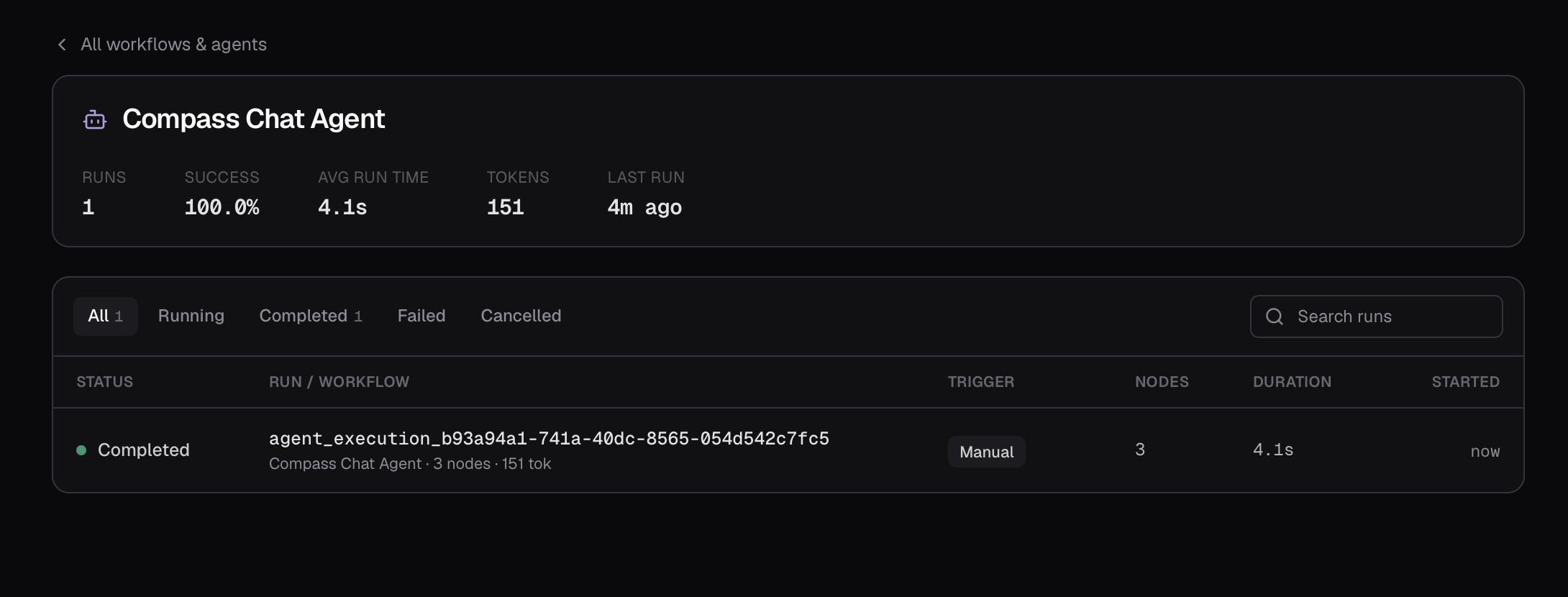
Opening a row focuses on that single agent or workflow: a header with its rollup metrics (total executions, success rate, average duration, total tokens, last execution) and how many are running right now, followed by an executions list filtered to just its executions.
Watching live
Executions in progress show up immediately — the Active now count and a live indicator mark anything currently running, and you can open an in-flight execution to watch it stream in real time.